Digital Development Studio
A high-performance creative workspace for 3D design, immersive media production, and advanced digital projects.
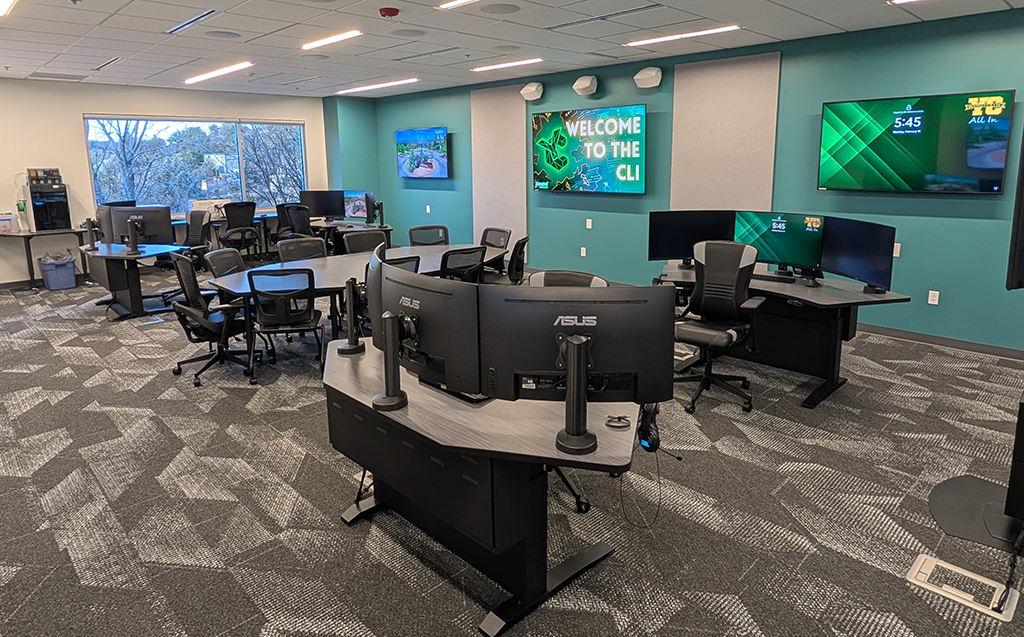
The Digital Development Studio at CLI-Prescott provides access to professional-grade workstations and technology for creating advanced digital content. Equipped with powerful computers, multiple large monitors, 3D printing capabilities, and collaborative screen-sharing technology, this studio is designed for students and faculty working on complex projects that require specialized software and hardware.
The studio supports advanced creative and technical projects across multiple disciplines:
Immersive Media Production
- Content for the YMAX Immersive Theater
- Virtual reality and augmented reality experiences
- 360-degree videos and interactive environments
- 3D environments and simulations
- Unity and Unreal Engine projects
Graphic Design and Digital Art
- High-resolution graphic design projects
- Digital illustration and concept art
- Animation and motion design
- Marketing and promotional materials
3D Modeling and Printing
- Physical model printing and manipulatives for hands-on learning
- Anatomical models with color-coded features (such as hearts with chamber identification)
- Replicas of fragile or rare historical artifacts
- Custom teaching aids and educational tools
Audio and Video Production
- Professional video editing and color grading
- Motion graphics and visual effects
- Documentary and narrative film editing
- Podcast production and audio post-processing
- Multi-track audio production and mixing
Game Development
- Video game design and programming
- Interactive simulations and educational games
- Character modeling and animation
- Level design and game mechanics testing
Workstations
- 4 high-powered computers with Intel Core Ultra i9, 32GB RAM, and NVIDIA RTX 2000 ADA discrete graphics
- 3 large curved monitors per station for expansive workspace and multi-tasking
- Headphones with spatial surround sound
- Optimized for resource-intensive software and rendering
3D Printing Technology
- Bambu H2D 3d printer
- Create physical objects from digital designs
- Produce durable, detailed models and prototypes
- Support for various materials and print sizes
Collaborative Screen Sharing
- Screen-sharing system for workshops and group projects, real-time collaboration and peer feedback
- Instructors can instantly project any student's work to room displays
- Ideal for critiques, troubleshooting, and collaborative design sessions
Software
The studio provides access to industry-standard creative and technical applications for:
- Video and audio editing
- 3D modeling and animation
- Game development engines
- Graphic design and digital art
- CAD and technical drawing
- VR/AR content creation
(Contact immersive-learning@yc.edu for a complete list of installed software or to request software installations)
Digital Badge Requirement
The Digital Development Studio requires users to complete a digital badge training program before independent use. This ensures you:
- Understand equipment operation and safety protocols
- Can effectively use the specialized software and hardware
- Know how to care for and maintain studio resources
- Are prepared to work independently on advanced projects
How to Get Certified
Contact CLI-Prescott staff to enroll in digital badge training for the Digital Development Studio. Training covers equipment use, software basics, safety procedures, and studio policies.
Request Micro-Credential Training (coming soon)
Students and Faculty with Micro-Credential
Once certified, students and faculty may reserve workstations or the full studio space for individual projects or class sessions.
Reserve the Digital Development Studio (coming soon)
Request a Consultation
Not sure if the Digital Development Studio is right for your project? Schedule a consultation with CLI staff to discuss your needs, explore the available technology, and determine next steps.
Request Consultation (coming soon)
Learn More About Micro-Credentials
Find out what the training involves, how long it takes, and what skills you will gain.