YMAX Immersive Theater
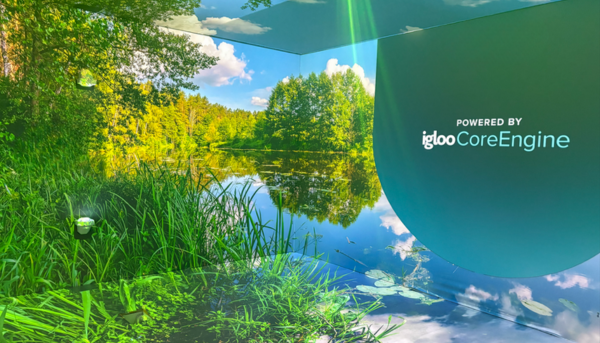
The YMAX is a fully immersive projection space designed to transform how students and faculty experience digital content. The YMAX surrounds viewers with 360-degree visuals, creating engaging educational experiences that enhance learning, collaboration, and creative expression. Whether exploring distant locations through virtual field trips, analyzing complex data visualizations, or showcasing student projects, the YMAX makes learning more memorable and impactful.
The YMAX supports a wide range of educational and creative applications:
- 360° videos and images – Immersive storytelling and environmental exploration
- Google Earth – Navigate the globe and explore geographic concepts
- Virtual field trips – Visit museums, historical sites, and natural wonders without leaving campus
- Student content showcase – Display student projects, presentations, and creative work
- Art exhibitions – Transform the space into an immersive gallery
- Accessible VR experiences – Inclusive virtual reality that accommodates diverse learners
- Interactive applications – Engage with web-based tools and simulations
- 3D CAD walkthroughs – Explore architectural and engineering designs at scale
- Data visualization – Display and analyze large datasets in immersive formats
- Unity and Unreal Engine projects – Present game design and 3D development work
The YMAX integrates seamlessly with the digital content and tools you already use:
- Canva – Design presentations optimized for 360° display
- Thinglink – Create interactive 360° experiences
- Google Earth and Google Street View – Geographic exploration Matterport – Virtual tours of real-world spaces
- YouTube 360 videos – Access thousands of immersive educational videos
- WebGL sites and web applications – Interactive browser-based content
- Generative AI applications – Explore AI-generated environments and visuals
- 3D modeling software – Unity, Unreal Engine, CAD programs
- Data analysis programs – Visualize complex information
Because YMAX uses a layer-based system, you can work with multiple types of digital content simultaneously—combining 3D models, videos, images, and interactive applications in almost any format from any source.
When you contact us, we will guide you through a consultative process to understand your needs, identify the best tools for your project, and provide training to ensure success in the YMAX environment.
Faculty Reservations
Faculty members may request use of the YMAX Theater for YC instructional purposes. All requests require review to ensure your content will display correctly and to provide technical support for your session. This process can take 2-4 weeks depending on complexity and availability of content.
When you initiate a request, we will give you a tour and review how the YMAX can be used for your class.
Student Reservations
Coming soon! A digital badge will be required to use the YMAX.
Staff Reservations
Schedule demos for your department or event.
YC Staff YMAX Information Request
Community Reservations
Community access to the YMAX Theater will be available at a later date.